.png)
Practices using the best project management tool for architects are spending less time chasing information and more time delivering the work that actually grows their business.
The best project management tool for architects is the gap most practices are not talking about, even as they invest heavily in the latest BIM platforms and AI design tools.
If you spent the last year upgrading your tech stack, new Revit licences, AI concept generators, maybe even an AR walkthrough tool, you are not alone.
Practices across the UK are racing to modernise.
But a familiar pattern is emerging: firms are pouring budget into design and visualisation tools while the actual project workflow still runs on email threads, shared drives and the occasional WhatsApp message to a contractor.
The result?
A practice that looks cutting-edge on a software list but feels chaotic from the inside.
And here is the uncomfortable truth.
Tools like Asana and Notion have helped plenty of general teams get organised but they were never built with architects in mind. They do not understand RIBA stages, planning submissions or consultant coordination.
That is why a growing number of UK practices are moving towards purpose-built solutions.
Tools like YoopKnows, designed specifically around how architectural projects actually run, are quietly becoming the coordination layer that holds everything else together.
In this article, we will walk through what a modern architect's tech stack actually looks like in 2026, shine a light on the piece most practices are missing, and reveal why the right project management tool might just be the most important software decision you make this year.
Most practices didn't plan their tech stack. It grew.
A Revit licence here, a visualisation tool there, and suddenly you've got six subscriptions and three different places where project information lives.
Sound familiar?
BIM is still the backbone of most UK practices. Whether you're on Revit, Archicad or Vectorworks, your BIM platform is where the real technical work happens.
Increasingly, practices are also pulling in early-stage cloud-native tools (like Snaptrude, Forma or Spacio) for fast massing and feasibility work before committing to full BIM modelling.
These tools are genuinely impressive.
But they model buildings. They don't manage your team.
AI has moved from novelty to necessity remarkably quickly.
Tools like Maket, Veras, Finch 3D, TestFit and D5 Render are now sitting inside real project workflows, not just on demo slides.
What used to take a technician a week can now take an afternoon. That's not hype, that's what practices are actually experiencing on live projects.
Client sign-off has always been tricky. Clients struggle to read drawings.
AR and VR tools are closing that gap, letting clients walk through a space in the browser before a brick is laid. Fewer late-stage design changes.
Fewer uncomfortable conversations on site.
But here's the honest reality: none of these tools tell you who is responsible for what, or whether your project is on track.
This is where it gets important.
Each tool in a modern architect's stack does something brilliantly. But brilliance in isolation is not the same as a practice that runs smoothly.
Here's a quick breakdown:
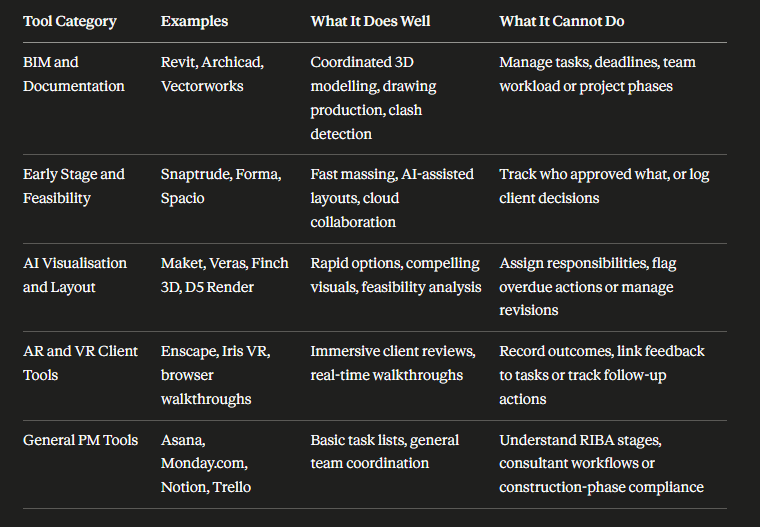
The gap in that final column tells the same story every time. Your tools are doing the design work. Nobody is running the project.
That is the missing piece.
You can have the best BIM setup in the country and still lose a week chasing one consultant's comments.
The tools are not the problem. The absence of a proper coordination layer is.
Picture this: Your team is mid-way through a planning application. The structural engineer sends revised loads over email. Someone action it informally over WhatsApp.
Three weeks later on site, nobody can confirm which version of the drawing reflects that change.
Sound familiar?
Most practices are running sophisticated design workflows on top of remarkably fragile project admin:
Every project moves through distinct RIBA stages, involves multiple consultants and carries real regulatory obligations.
Architects need to track:
Generic tools were simply not built for this. And that gap is costing practices dearly.
Read: How Architects Can Stop Drowning in Projects: Smarter Workload Management for the 2026 Construction Boom
Having great design tools without a proper PM hub is a bit like having a brilliant site team with no programme.
Everyone is busy. Nobody is quite sure what happens next.
Most practices reach a tipping point.
The tools multiply, the projects grow and suddenly the principal is spending Monday mornings just trying to work out where everything stands. That is not a technology problem. That is a coordination problem.
YoopKnows sits above your existing stack as the central operating system for your practice:
Nothing replaces your design tools. YoopKnows simply makes sure someone is actually running the project underneath them.
Imagine opening one screen on a Monday morning and seeing every live project, every outstanding task, every approaching deadline and every overloaded team member across your entire practice.
No inbox trawling. No spreadsheet gymnastics.
That is what YoopKnows delivers:
Here is where the real value shows up.
A contractor raises a query on site. Your architect uploads the relevant BIM export, attaches the AI generated option that informed the decision and logs the client approval.
All in one place. All tied to the right task.
Six months later when the client questions that decision, you have a complete, clear record. No scrambling. No he said she said.
Just an honest, traceable project history that protects your practice and demonstrates professional competence.
That is the difference between a tool pile and a system.
Investing in the right project management software for architects does not just tidy up your workflow.
It fundamentally changes how your practice performs day to day.
That Friday afternoon spent hunting through three email threads for the latest door schedule? Gone. Automated reminders and shared task boards keep everyone aligned without the inbox archaeology.
When your M&E engineer and structural consultant are both waiting on the same drawing package, a central coordination layer means nobody is sending chase emails into the void whilst deadlines slip quietly past.
Post-Grenfell and under the Building Safety Act, accountability is not optional. When a building control inspector asks who signed off a particular detail and when, your project history gives you a clear, defensible answer without a single panic.
Every principal knows that feeling of realising someone on the team has been quietly drowning under three overlapping deadlines. Live workload views surface that problem before it becomes a resignation letter.
When a client rings asking why their planning submission is delayed, having a clear timeline and decision record means you respond with confidence and evidence rather than putting them on hold whilst you piece together the story.
Most practices already have the design tools.
What this stack does is show you where YoopKnows sits and why everything else works better because of it.
Think of it less as a software list and more as a functioning system where every tool has a clear role.
Your BIM platform, whether Revit, Archicad or Vectorworks, remains the backbone for coordinated modelling, drawing production and technical documentation.
Early stage feasibility tools handle quick massing and concept work before full BIM modelling begins. The BIM does the heavy lifting. It just needs someone coordinating the people around it.
AI tools are now handling layout generation, rapid feasibility studies and client visuals inside real project workflows, not just on conference slides.
Chat based AI is increasingly writing planning statements, design and access statements and internal reports, freeing up architects to focus on the work that actually requires professional judgement.
The time savings are genuine and practices that have embraced this are already pulling ahead.
Browser based walkthroughs and VR tools are bringing clients into the design process earlier than ever before.
When a client can actually walk through their building before planning is even submitted, you get better feedback, fewer late stage design changes and far fewer uncomfortable conversations on site.
This is where everything connects. YoopKnows is the best project management tool for architects precisely because it does not try to replace your design tools. It organises everything around them:
2026 is an exciting time to run a practice. But technology alone does not make a practice run well. The practices pulling ahead are not necessarily those with the most tools.
They are the ones who have built a coherent system around them.
By making YoopKnows your central coordination hub, you are not just getting organised. You are building a practice that delivers better design, fewer errors and stronger compliance.