.png)
Best project management tool for architects: that's the search term more UK practices are typing into Google at 11pm, somewhere between chasing a consultant for feedback and hunting down the "final_final_v3" file.
And the timing isn't a coincidence.
RIBA's second AI survey revealed that AI usage among UK practices has leapt from 41% to 59% in just a year with nearly two-thirds of architects (65%) now believing AI will boost both industry productivity and help the sector meet its net-zero targets.
So here's the question worth asking: if six in ten practices are using AI, why does project delivery still feel just as chaotic as before?
The honest answer is that most practices have upgraded their design tools but not their delivery process.
AI is speeding up concepts, visuals and briefs, but the humans behind those outputs are still stuck chasing approvals over email, hunting for the latest file version, and trying to remember who owns the next step.
RIBA's own report flags real concerns too; 67% worry about imitation risk, and 44% worry about accountability.
Speed without structure just creates new problems.
This is exactly the gap YoopKnows was built to close.
As the best project management software for architects working in the UK, it doesn't replace your AI tools; it gives them somewhere to land, with clear ownership, deadlines and an audit trail attached.
Be honest, how many times have you scrolled through WhatsApp trying to find the one message where the client actually approved a revision?
Or dug through five email chains to work out which drawing is the current one?
Generic tools like Slack, WhatsApp and Excel weren't built for the way architects actually work, and it shows the moment a project gets past Stage 2.
These tools don't understand RIBA stages, they don't track revisions in any meaningful way, and they definitely don't cope with the tangled web of clients, consultants, contractors and planning officers all needing different updates at different times.
Everything just becomes one long, unsorted feed.
Here's what that actually looks like day to day:
Drawing revisions get renamed five different ways, so nobody's sure which file is current or approved
Let's put the mismatch side by side, because it's a lot clearer once you see what each tool actually gives you versus what your practice really needs.
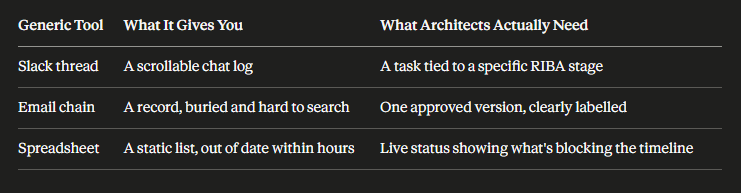
The real cost isn't the mess itself, it's the guesswork.
You spend more time figuring out what's holding a project up than actually pushing it forward.
This is exactly the gap YoopKnows fills.
It's not another app competing for your attention, it sits above the tools you already use as the central operating system for the whole project.
Every AI generated design, every visual, every concept gets linked to a real task, a real person and a real deadline. Nothing floats around unowned.
That's the shift from AI chaos, where great ideas go nowhere, to AI efficiency, where every output has somewhere to land and someone accountable for moving it forward.

Adopting AI is the easy part, if we're honest.
Getting it to actually save you time across a whole project, from concept to sign-off, is where most practices hit a wall.
Here are five (5) practical ways YoopKnows closes that gap, turning AI outputs into genuine, measurable productivity rather than another thing cluttering up your inbox.
You've generated a stunning concept in minutes. Brilliant.
Except now it's sitting in a downloads folder somewhere, and nobody on the team actually knows what to do with it next.
Sound familiar?
This is the quiet failure point in most AI adoption stories.
The output exists, but the ownership doesn't, and that's exactly the kind of gap that turns a five minute win into a two day delay.
Here's what changes once every AI output lives inside a proper task rather than a folder:
That's the difference between having an output and actually using it.
Here's a familiar bottleneck.
AI produces a lovely concept massing study, and then it just sits there because nobody's formally handed it over to the BIM team. Days pass.
Someone asks "has this gone to Revit yet?" and the honest answer is nobody's quite sure. Every practice has lived some version of this exact moment.
This is where automated handoffs earn their keep, quietly doing the coordination work you'd otherwise chase by email:
You end up with a genuine pipeline from AI idea to BIM reality, rather than a series of disconnected steps held together by memory and goodwill.
Anyone who's run a practice knows this pattern.
AI speeds up the design side beautifully, but suddenly your coordination team is drowning because nobody spotted they were already at capacity.
Speed in one part of the process means nothing if it just creates a pile-up somewhere else, and by the time you notice, someone's already working weekends to catch up.
A live view of who's doing what changes that dynamic entirely:
This is what turns AI's speed into a genuine team advantage, instead of just shifting the bottleneck somewhere less visible.
Let's be honest about where most project managers actually lose their time.
It's not the design work. It's the chasing.
Chasing a client for feedback on a render. Chasing a consultant who's gone quiet for a week. Chasing your own team for an update you should already have.
If you've ever drafted a "just following up" email at 6pm on a Friday, you already know this pain.
Automating that follow-up work is where the real hours get clawed back:
Hours you'd have spent chasing get handed back to you, and that adds up fast across a busy project list.
RIBA's own research found that 67% of architects are worried about AI increasing the risk of imitation, and that concern is entirely fair.
If a design decision ever gets questioned, or a client asks "who signed this off," you need a straight answer, not a scramble through old emails.
A proper audit trail builds that record for you automatically, as the work happens:
That's hours of documentation saved, and genuine peace of mind that your IP and decisions are properly protected.
Hitting 59% AI adoption is a start, not a finish line.
Real productivity comes from managing the workflow around it, not just the design. YoopKnows, the best project management tool for architects, is the bridge between fast design and fast delivery.
So, be honest, are you using AI but still drowning in emails?
It's time to fix that.
Adopt YoopKnows and turn your 59% AI adoption into a genuine productivity gain for your whole practice.